Showing posts with label Vue. Show all posts

Sunday, March 10, 2019

Exercises for Programmers: 57 Challenges to Develop Your Coding Skills - Chapter 3, Paint a Room - L-Shaped

Here it gets a bit more interesting...the goal is L-shaped.  I should have let people pick the kind of room and used one app.  That's not a difficult mashup.


This time the challenge was also to make it accessible via mobile.  The nature of Vue is that it works on mobile so I did.....nothing.  That's not entirely true, I added /embedded/result to the URL to make it show on the screen.

https://jsfiddle.net/NodToNothing/7jasm205/embedded/result

So here are three screens showing the fiddle working on my mobile phone.  Reactive changes working as expected.


And some code:

Exercises for Programmers: 57 Challenges to Develop Your Coding Skills - Chapter 3, Paint a Room - Square

Room area....did I already do  a room area/paint calculator?  I did...I did that room calculator.  This one is for finding the amount of paint.  So it's a bit of a mash up of the last exercise (pizzas) with a Math.ceil() and the area calculator.  This first swipe took moments.


The Code:

Sunday, March 03, 2019

Exercises for Programmers: 57 Challenges to Develop Your Coding Skills - Chapter 3, Pizza Slices, Version 2

The second version of the pizza exercise was about changing the formula.  It was only a bit of math.  I was confused because my Math. functions weren't working right.  But it had nothing to do with Math.  It was all about my lack of a return keyword and some bad parens.  I've become better at sussing those out - fewer initial assumptions on my part.

JSFiddle: https://jsfiddle.net/NodToNothing/pz3Lhu2m/

The math is a bit more difficult to work out mentally than the other pizza exercise.  I almost had to write it down to make sure it was right.  I didn't do the part with use "piece" or "pieces" depending on 0, 1, many.  That seems like busywork.


The Vue.js code:


Saturday, March 02, 2019

Exercises for Programmers: 57 Challenges to Develop Your Coding Skills - Chapter 3, Pizza Slices

Exercise 8: Pizza Party

I think my default is now Vue - I'm getting lazy.  I have the numeric validation figured out and the hooks, so it's just easy to cut and paste and modify.  Or fork and set as base and modify, if you're fiddling.  The big rule in this exercise...no partial pieces of pizza.

There's a part b to ask how many pieces each person wants and then calculate full pizzas.  That's primarily different math, but I"m going to do it anyway.


Thursday, February 21, 2019

Exercises for Programmers: 57 Challenges to Develop Your Coding Skills - Chapter 3, Room Area

Chapter 3 be all about da math!

Exercise one (or 7, depending on where you start) is calculate the area of a room, with challenges related to using a UI, validating the numbers, and offering meters and feet.  I cheated and did both meters and feet as separate UI bits rather than a drop down because I'm lazy.  I get the drop down.

This does give me an interesting idea...something to ideate on myself.

Here's the Fiddle: https://jsfiddle.net/NodToNothing/uas3foex/23/

The output....


And the code...

Monday, February 18, 2019

Exercises for Programmers: 57 Challenges to Develop Your Coding Skills - Chapter 2, Retirement Calculator

I realized I claimed credit for reading all of chapter two, but had an exercise left, so I thought I'd better get it done today after a bit of Far Cry New Dawn so I'm not strictly lying to myself (my days are sometimes off in my reading list, but in general I try to keep them aligned within a day or two)..

JSFiddle: https://jsfiddle.net/NodToNothing/ehk24y50/
Fiddles: https://jsfiddle.net/user/NodToNothing/fiddles/

Exercise 6 was a retirement calculator.  Amusingly, I can see in that last Fiddle where I'm reusing Vue code and leaving in bits, like the default being Scooter, where it doesn't matter because I'm working with numerics, not strings.  So....ignore those parts.  At the very least, I don't want to hear about it because it doesn't matter except for elegance/purists.  It's not like I have someone sitting nearby to code review my hobby activities.

I did learn a bit more about the difference between computed properties and functions in Vue, so that was useful in the context of this snippet.  No methods in there, but....that's because I really didn't need them once I started playing around a little more.

The code...less than in some of the others.  Vue takes a lot of the work out of things:

Exercises for Programmers: 57 Challenges to Develop Your Coding Skills - Chapter 2, Simple Math

I was right.  The simple math exercise was really, really simple.  Use Vue and it'll lock the format to numeric, has a UI, autoupdates the answers and, with a min and a bit of javascript (validity.valid) enforces 0+, aka no negative numbers, per the exercise challenges.

Fiddle: https://jsfiddle.net/NodToNothing/f18vahdp
Fiddles: https://jsfiddle.net/user/NodToNothing/fiddles/

Output working as advertised:


The Fiddle code...

Sunday, February 17, 2019

Exercises for Programmers: 57 Challenges to Develop Your Coding Skills - Chapter 2, Mad Lib (4) - Vue.js style with Drop Downs

Wow...the length of these titles is getting a bit off the hook.  Maybe I need to go with EfP57 as a short form.  I lose my keywords; but I don't care about my keywords.

The challenge for the madlib exercise was to put some control logic in the system.  I didn't like the acceptance criteria, because there's some knowledge of what's being entered that's necessary.  To avoid that, I thought I could force the user down a path of limited choices....aka a select/dropdown.  In that case, the branching logic is pretty straightforward because you know the possible values.  I see where to implement it in the display of the sentence using the computed property.  Getting the drop downs set up in the first place was the hard part.  Vue isn't intuitive to me.  Although, and I am ashamed, flipping "key" to "name" in the bound property was so simple I'm embarrassed it took as long to intuit as it did.  This will also be the first exercise with code so long it doesn't fit in an easy image, so all I'm posting is the textarea with scroll.

So here's the fiddle: https://jsfiddle.net/NodToNothing/L8rpd6ak/
Here's all my fiddles: https://jsfiddle.net/user/dashboard/fiddles/

Here's my oops where I use the key instead of the name.  I tried to get to the object via some collection notation [index] and failed repeatedly even though I got back a viable object inserting those indexes.

You can see it inserting the indexes into the concatenated sentence above.  That IS hilarious.

And there it works.  The trick was changing :value="verb.key" to :value="verb.name".  Simple.  Easy Peasy.  But I couldn't find an example on the web.  All sorts of other examples, just not that one.  And as you can see from the "person" code, I borrowed the initial code for modification and the example of how to flip it wasn't there.  Well, for as stupid as that was, I feel undeservedly smart. And I can finally move on to exercise #5 "Simple Math" which must be easier.

Wednesday, February 13, 2019

Exercises for Programmers: 57 Challenges to Develop Your Coding Skills - Chapter 2, Mad Lib (4) - Vue.js style

I thought a madlib lended itself more appropriately to Python, but perhaps that's because I grew up in the age of Zork and Leather Goddess of Phobos.  It works just fine with Vue, although the branching it's asking for next might be a challenge.  I haven't really tried control statements with Vue.  Wait, that's not true - I used the for/next in the random quote example.

I might actually have to put a little thought into the structure for that one.  I'm not sure what "branching" means in that context.  Select one of two verbs at random, and then use the other one later?  Allow them to only select from a few options and branch depending on the one they select?  That second one makes more sense if I'm not going to implement some NLP weirdness.  I haven't used a dropdown in Vue, so that will be a good challenge.


The code....I wonder how long until these start exceeding my textarea and I'll have to actually change the tag attributes.

Monday, February 11, 2019

Exercises for Programmers: 57 Challenges to Develop Your Coding Skills - Chapter 2, Quotes

https://jsfiddle.net/NodToNothing/kac3o5hj/

Again, I made up my own A/C a bit.  The example called for separating the quote from the attribution, and I see how to do that, but I'm not going to.  I had more fun inserting a randomizer for Princess Bride quotes.  The top quote is random, but the bottom unordered list shows all the quotes in the Vue list so I could try a control loop.


Exercises for Programmers: 57 Challenges to Develop Your Coding Skills - Chapter 2, Word Count

https://jsfiddle.net/NodToNothing/Lk5wsxab/8/

Well, I was going to limit myself to one exercise per day, but this seemed pretty straight forward given the last JSFiddle - use a built in length function (that was momentarily tricky because I wanted to use str. and length(), but it was intuitive), avoid nothing, count every key press. That last one was pretty much a gimme from Vue using computed properties (although I could have done it inline).


Code, in case I lose my fiddles...

Exercises for Programmers: 57 Challenges to Develop Your Coding Skills - Chapter 2, Saying Hello

https://jsfiddle.net/NodToNothing/arbhqcs6/3/

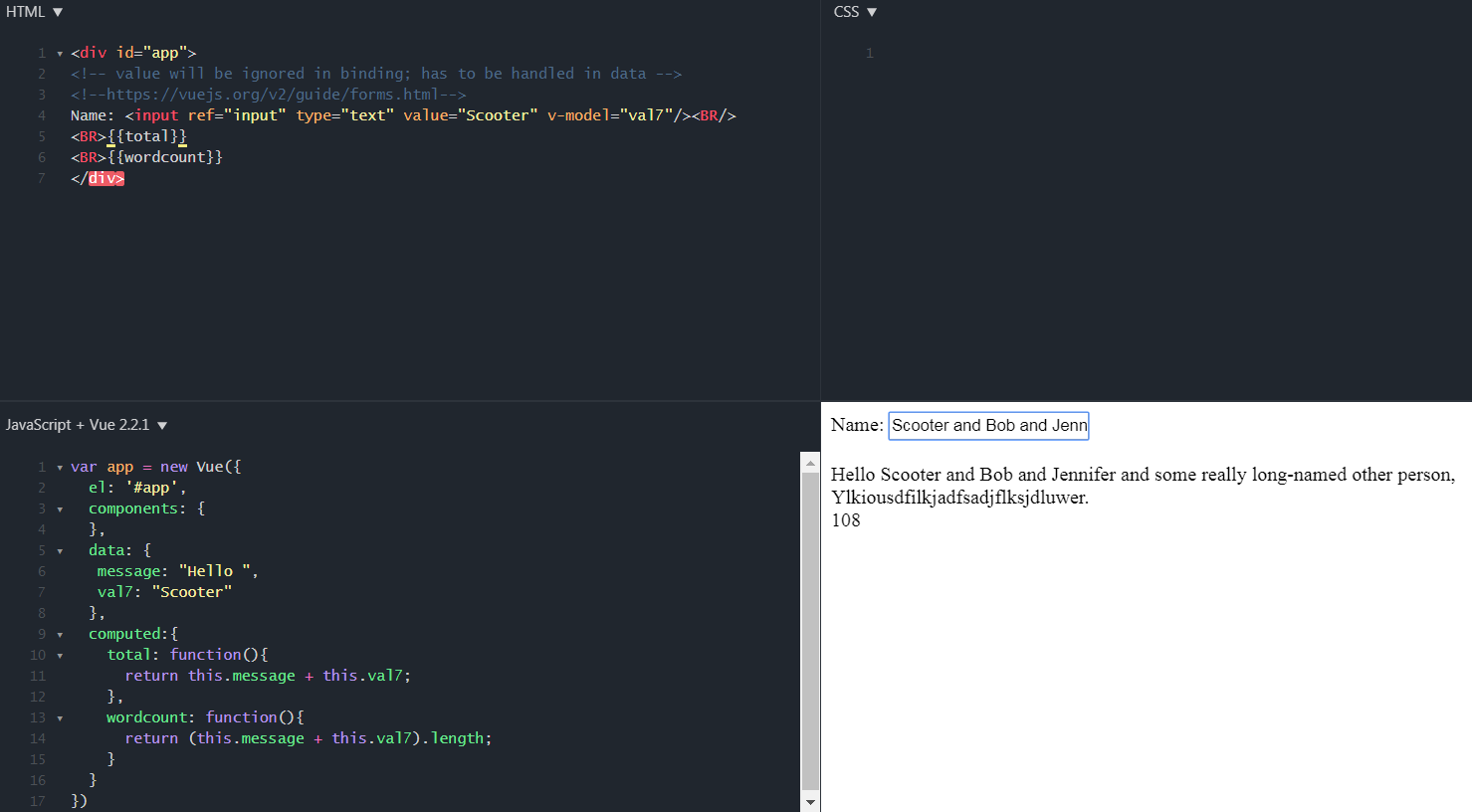
Interesting exercise - keep the input, concat, and output separate.  Write it without variables and do different greetings for different people.  In the end, I'm the arbitrator of what constitutes the acceptance criteria, so I used Vue again and bound the mustache output to a function tied to an input box.  Admittedly, I could have skipped the function altogether and just printed Hello in HTML and then the value of the input box.  No concatenation at all, at least not actively.

I did learn that Vue ignores the value on the input and you need to set it in the initial data values.  There's a lot of magic under the covers tying the message variable and val model together in a function mapped to the HTML.  That's slick.  I shouldn't be too impressed given I played with React back in 2013 for a team demo and have been through Angular training, but I find it refreshing anew, particularly given how fast you can set up a UI.  VB COM speed to demo days indeed.


Cheater textarea again for anyone who wants to grab some "code", although it's easier to go to the JSFiddle.  I got to thinking I'd usually do this in Python (and IDLE) and it looks like I can go Py fiddle as well: https://pyfiddle.io/  Although that's not really any faster than running IDLE on my desktop.

Sunday, February 10, 2019

Exercises for Programmers: 57 Challenges to Develop Your Coding Skills - Chapter 1 Part g/h

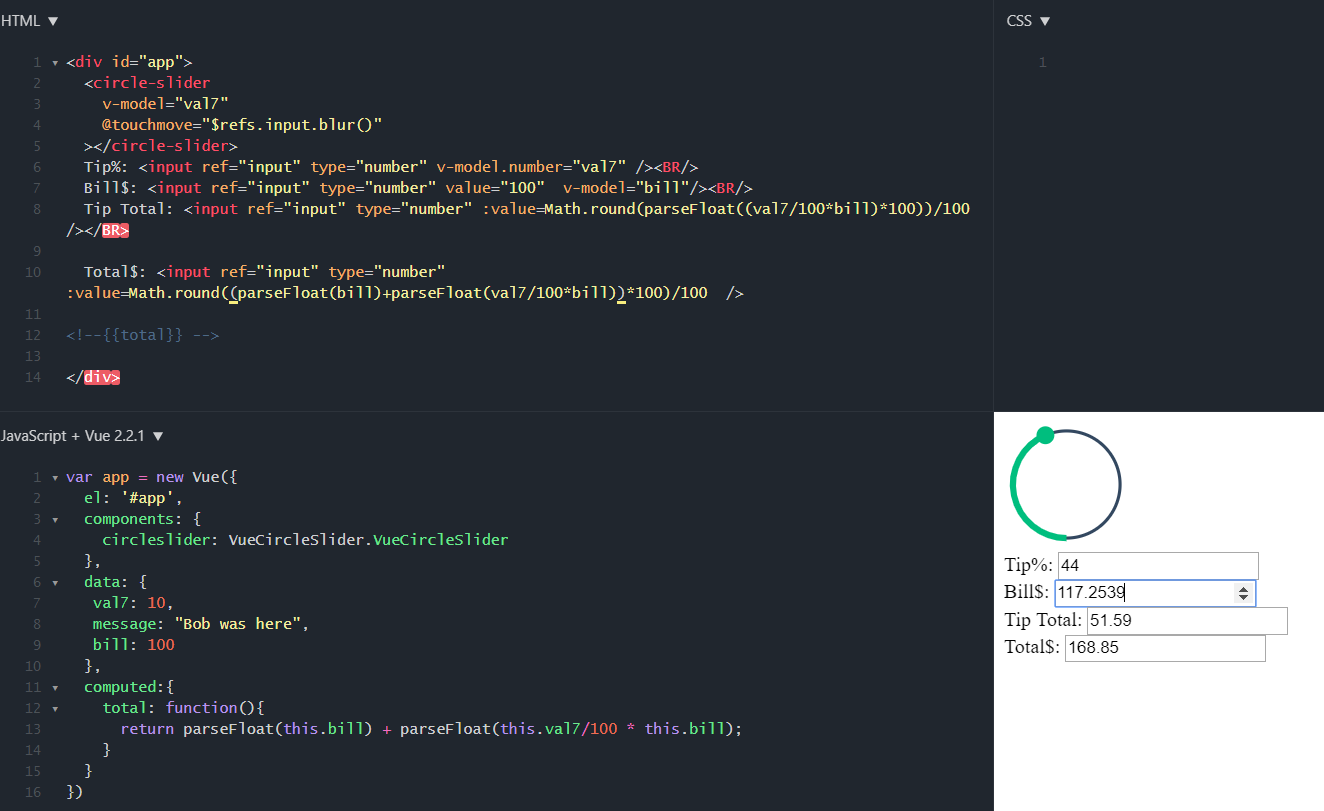
Ok....now it gets tricky.  I'm supposed to turn the tip calculator into a GUI, and then a GUI with a slide.  I could just use C#, but that's pretty week.  I might as well go VB COM (and in case that's offensive, I still have a secret santa program running on VB COM including Outlook integration for almost 15+ years.  I compiled it and just use it...I'm too lazy to update.  If I went digging, I probably have tgXML around as well, my treasure generator using XML in VB COM for AD&D third edition).  So I was thinking I might try pure javascript, but then thought, well, I'll have to pull in bootstrap and this npm live-server thing is cool, but ultimately sort of a waste of my time and disk space.  And as soon as I thought that, I thought, why don't I just use Angular?  And that made me think, that seems so heavy...oh yeah, people use Vue and React. I pondered React, but realized I have a developer on my team who keeps telling me how wonderful it is so, being the obstinate person I am, I used Vue, on JSFiddle so I could use someone's pre-fiddled fun circle slider, and save my work without having to find it locally.

My biggest issue wasn't the basic structure of Vue, it was trying to parseFloat and Math.roundup and get it to work within the framework of Vue without concatenating.

Here it was doing the stupid concatenation instead of math, which really annoyed me, because it wasn't a Vue-specific issue.

Here I fixed it.  You can see where I started to put it into a function instead of inline, which is better, but I was lazy and just proving my point (that I could do it).


You can play with it here...
https://jsfiddle.net/NodToNothing/e6c7amk9/1/

And here's the code using a cheater textarea....